DSD Software
DSD Software for Distributors
Route Accounting, Delivery, and Mobile Ordering - Offline First
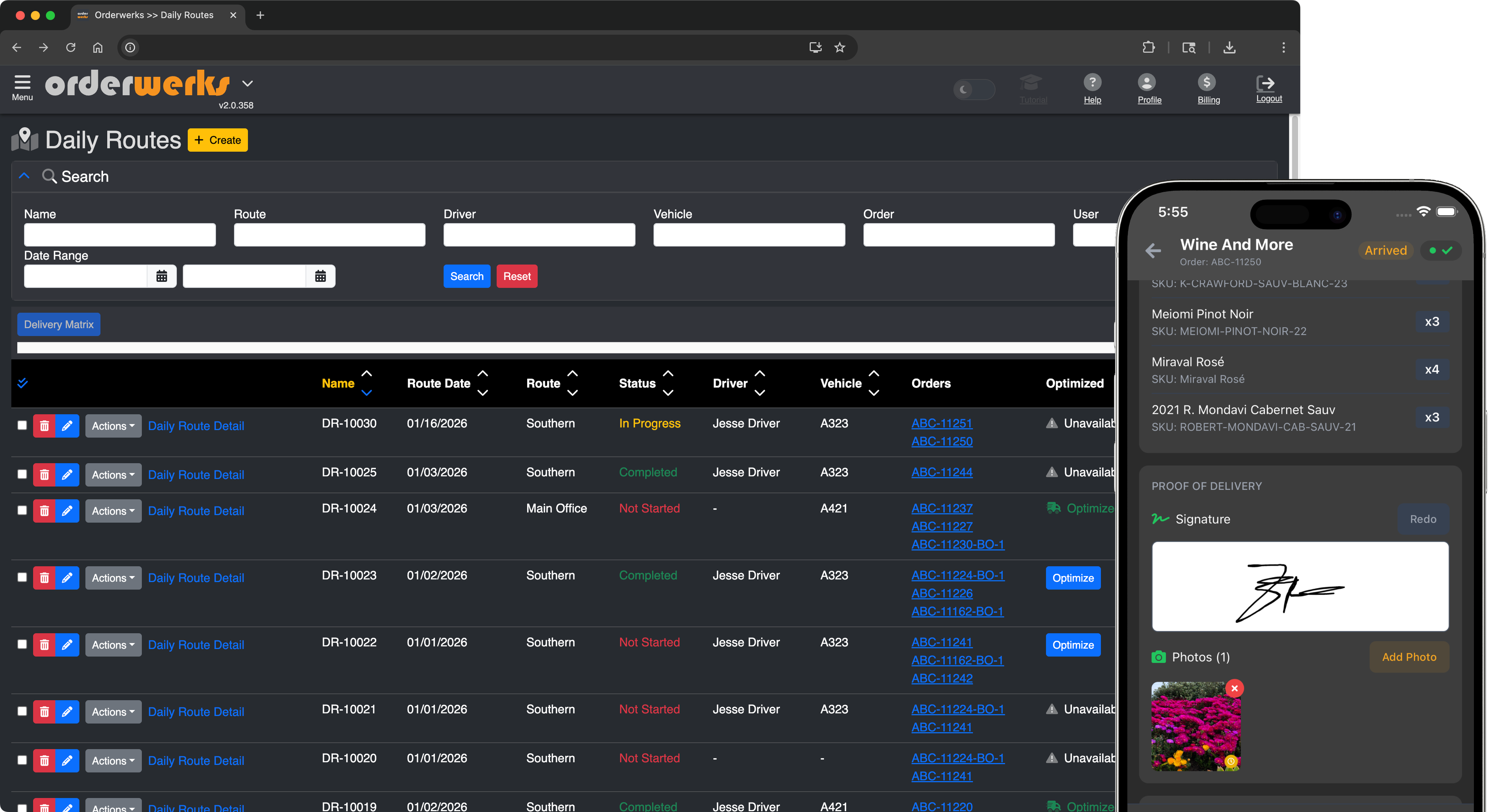
Orderwerks DSD software gives distributors everything they need to manage direct store delivery operations from a single platform. Route accounting, invoicing, proof of delivery, and real-time inventory - all working offline on iOS and Android.
Most DSD operations stitch together 3-4 disconnected tools. Orderwerks gives your sales reps, warehouse staff, and drivers one platform that works offline and syncs when connected.
Now Available
Run a van sales (van-sell) operation? Enroute Pro adds truck inventory, selling at the stop, payment capture, signed invoices, and end-of-day reconciliation to the Enroute driver app.
Sound Familiar?
The reality of running DSD routes
Sales reps take orders in the field but the data doesn't flow cleanly to the warehouse for picking and loading
Drivers on routes lose connectivity and can't confirm deliveries or update order status in real time
No single system connects the sales rep, the warehouse, and the driver - so reconciliation is manual
Paper-based route sheets and delivery confirmations create data entry backlogs at the end of every day
Disconnected systems mean the office doesn't know what's been delivered until the driver returns
Re-keying orders into QuickBooks for invoicing wastes hours and introduces errors
Van-sell drivers hand-write invoices at the stop and the office keys them in later, if they don't get lost first
What is DSD Software?
DSD software (Direct Store Delivery software) is a platform that manages the entire process of delivering products from a distributor's warehouse directly to retail store shelves - bypassing third-party distribution centers. It covers order entry, warehouse fulfillment, route planning, delivery confirmation, and back-office reconciliation in one connected system.
DSD software is widely used by beverage, snack, tobacco, and wholesale distributors who run pre-sell or van sales routes. Orderwerks covers both: pre-sell, where reps take orders ahead of delivery and drivers deliver them, and van sales, where drivers sell from truck stock at the stop with Enroute Pro. Every step works offline on native iOS and Android apps.
Built for Pre-Sell and Van Sales
How Orderwerks Solves DSD Route Accounting
Offline-First Order Entry
Sales reps enter orders in the field using our native iOS/Android app - even without cell service. Orders sync automatically when connectivity returns. No lost orders, no double entry.
Large Catalog Support
Handle 50,000+ SKUs on device without lag. Your full product catalog lives on the app, not in the cloud. Reps browse, search, and order against the complete catalog at every stop.
Delivery Confirmation & Proof of Delivery
Drivers confirm deliveries, capture signatures, and note discrepancies from the Enroute mobile app. Data flows back to the office in real time or syncs when back in range.
Order-to-Delivery Visibility
Track every order from entry through fulfillment to delivery confirmation. The office sees order status across all active routes without waiting for drivers to return.
QuickBooks Integration
Orders flow directly into QuickBooks Desktop or Online for invoicing. No re-keying, no reconciliation spreadsheets, no end-of-day data entry marathons.
Customer-Specific Pricing & Terms
Set pricing tiers, payment terms, and product availability by account. Reps see the right prices for each stop automatically - on device, even offline.
Van Sales with Enroute Pro
Drivers confirm their truck load each morning, sell from live truck stock with customer-specific pricing, take cash, check, or net terms, and hand over a signed invoice at the stop. End of day, they count stock and cash and submit the reconciliation. Orders and payments push to QuickBooks.
Learn moreOne Connected Platform
The Full DSD Workflow
From the sales rep's first stop to the office's final reconciliation - every step connected
Rep Takes the Order
Sales App
Sales reps visit customer locations and enter orders using the native iOS or Android app - even without cell service. Full catalog on device with customer-specific pricing.
Order Hits the Office
Web Portal
Orders sync to the web portal automatically. The office reviews, approves, and queues orders for fulfillment. QuickBooks invoices generate without re-keying.
Warehouse Picks and Loads
Fulfillment
Pick lists generate by route. Warehouse staff pick, pack, and stage orders for each truck. Orders move through fulfillment connected to the original order.
Driver Delivers the Route
Enroute App
Drivers view their daily route in the Enroute app. They navigate to each stop, confirm deliveries, capture signatures, and note any discrepancies. On Enroute Pro, drivers also sell from truck stock at the stop, take payment, and hand over a signed invoice.
Office Reconciles
Reporting
Delivery data flows back to the office. Compare what was ordered vs. delivered. Identify returns, shortages, and exceptions - all connected to the original order and invoice. Van-sell drivers submit an end-of-day count of truck stock and cash, with variances flagged for the office.
Built for DSD Industries
Industries That Run Route-Based Delivery
Beverage Distribution
Wine, spirits, beer, and soft drink distributors running pre-sell routes to bars, restaurants, and retailers
Tobacco Distribution
Tobacco and nicotine product distributors with compliance requirements and high-frequency route stops
Snack & Food Distribution
Snack, bakery, and specialty food distributors delivering to convenience stores, grocers, and food service
Consumer Goods Distribution
Any consumer goods distributor with route-based delivery to retail locations
Why Orderwerks
Not Another Generic Tool
Disconnected DSD Tools
- ERP that takes 6 months to implement and still needs bolt-on mobile apps
- Delivery-only app that can't handle order entry or fulfillment
- Web-based ordering that dies without WiFi - useless in the field
- Separate systems for the rep, the warehouse, and the driver with manual handoffs
- End-of-day reconciliation done in spreadsheets
- Van sales bolted on as a separate POS that doesn't know your inventory or pricing
Orderwerks
- Up and running in days, not months - no IT project required
- Order entry, fulfillment, and delivery in one connected platform
- Native iOS and Android apps that work offline - built for the field
- Rep, warehouse, and driver all on the same system - no handoff gaps
- Orders flow to QuickBooks automatically - reconciliation built in
- Pre-sell and van sales on the same driver app, same catalog, same QuickBooks sync
Recognized by G2 • Fall 2026




See It In Action
Book a Demo
See how Orderwerks connects the full DSD cycle - from order entry to delivery confirmation to QuickBooks invoicing. We'll walk you through the Sales App, the web portal, and the Enroute driver app.
Questions?
Frequently Asked Questions
DSD software (Direct Store Delivery software) manages the full cycle of getting products from your warehouse to retail shelves. It connects order entry, warehouse fulfillment, route delivery, and office reconciliation in one system. Route accounting, invoicing, proof of delivery, and inventory tracking all flow together so distributors can run their entire DSD operation from a single platform.
Both. For pre-sell, sales reps take orders ahead of time in the offline-capable Sales App, the warehouse fulfills and loads trucks, and drivers deliver with the Enroute app. For van sales, Enroute Pro lets drivers confirm their truck load, sell from live truck stock at the stop, take payment, and hand over a signed invoice, then reconcile stock and cash at end of day. One driver can run both on the same route: the Pro load sheet shows pre-sold orders alongside truck stock. Learn more at orderwerks.com/solutions/van-sell.
Yes. Our native iOS and Android app stores the full product catalog on the device. Reps can browse products, look up customer pricing, and create orders with zero connectivity. Orders queue locally and sync automatically when the device reconnects.
The app is built to handle large catalogs - 50,000+ SKUs on device. The full catalog downloads during initial setup and syncs incrementally after that. On-device search uses full-text indexing so lookups are fast regardless of catalog size.
Drivers use the Enroute app (iOS or Android) to view their daily route, navigate to each stop, and confirm deliveries. They can capture signatures, note discrepancies, and update stop status. Data syncs back to the office in real time or queues for sync when connectivity returns.
Yes. Orderwerks integrates with both QuickBooks Desktop and QuickBooks Online. Orders sync to QuickBooks for invoicing automatically - no re-keying or end-of-day data entry. Customers, products, and pricing stay in sync between systems.
Our Delivery Management page focuses on the Enroute driver app - route planning, driver tracking, and proof of delivery. This page is about the full DSD workflow from start to finish: order entry by the sales rep, warehouse fulfillment, truck loading, route delivery, and office reconciliation. Enroute is one piece of the DSD puzzle. This page shows how all the pieces connect.
Pricing starts at $60/user/month for the Sales App. Contact us for a quote based on your number of sales reps, drivers, and warehouse users. No long-term contracts required. Enroute is $150/month plus $25/driver/month; Enroute Pro for van sales is $150/month plus $50/driver/month.
Yes. Orderwerks supports pre-sell workflows where reps take orders in advance for later delivery. Sales reps visit accounts, enter orders on the mobile app (even offline), and the warehouse picks and loads route trucks for scheduled delivery.
Yes. The Orderwerks Enroute delivery app captures electronic signatures, photos, timestamps, and GPS coordinates as proof of delivery. All data syncs back to your dashboard in real time.
Yes. Orderwerks is offline-first, meaning drivers and reps can take orders, process deliveries, and capture proof of delivery without internet access. Everything syncs automatically when they reconnect.
Look for offline-first mobile apps (reps and drivers lose connectivity constantly), built-in invoicing and proof of delivery, QuickBooks or ERP integration, customer-specific pricing, large catalog support, and route optimization. The best DSD software connects order entry, warehouse fulfillment, and delivery in one platform so you avoid re-keying data between disconnected tools.
Learn More
Related Content
Delivery Management
Learn more about the Enroute driver app - route planning, driver tracking, and proof of delivery.
Learn more
Order Management
See how Orderwerks handles the full order lifecycle from entry through fulfillment and invoicing.
Learn more
Sales App
Explore the mobile app your sales reps use for offline order entry in the field.
Learn more
Trade Show Ordering
Offline order entry for convention center booths, buyer markets, and event floors.
Learn more
Van Sales (Enroute Pro)
Drivers sell from truck stock, take payment, and invoice at the stop. Offline-first, syncs to QuickBooks.
Learn more
GuideRoute Accounting Software for Distributors
Complete guide to DSD route accounting - what it is, how it works, pre-sell vs van sales, and what to look for in software.
Read guide
Ready to connect your DSD operation?
Stop stitching together disconnected tools. See how Orderwerks ties your sales reps, warehouse, and drivers into one platform that works with or without connectivity.
