Convention Center Wi-Fi Fails.
Orderwerks® Doesn't.
Offline B2B Order Entry App for Trade Show Booths
Your reps keep taking multi-line wholesale orders through slow Wi-Fi, no Wi-Fi, and packed hall floors. Full catalog browsing, customer-specific pricing, barcode scanning, and multi-brand catalog support on native iOS and Android. Orders queue locally and sync when the rep taps sync - after each order, at the end of the day, or on hotel Wi-Fi after the show.
Trade Show Booths Break Generic Ordering Apps
Shared Wi-Fi drops under convention center load. Cell service drops inside metal-clad exhibit halls. Buyers arrive in waves during peak hours. Your reps need to capture 10, 20, or 50 line orders in the time it takes a buyer to glance at samples and move to the next booth. A web app with an offline toggle cannot hold that workflow together. An app built offline-first does. Orderwerks was built for the wine trade show floor, the tobacco distributor expo, the wholesale buyer market, and every ATF-regulated firearms show where orders cannot wait for connectivity.
What Trade Show Ordering Looks Like on Orderwerks
Offline multi-line order entry
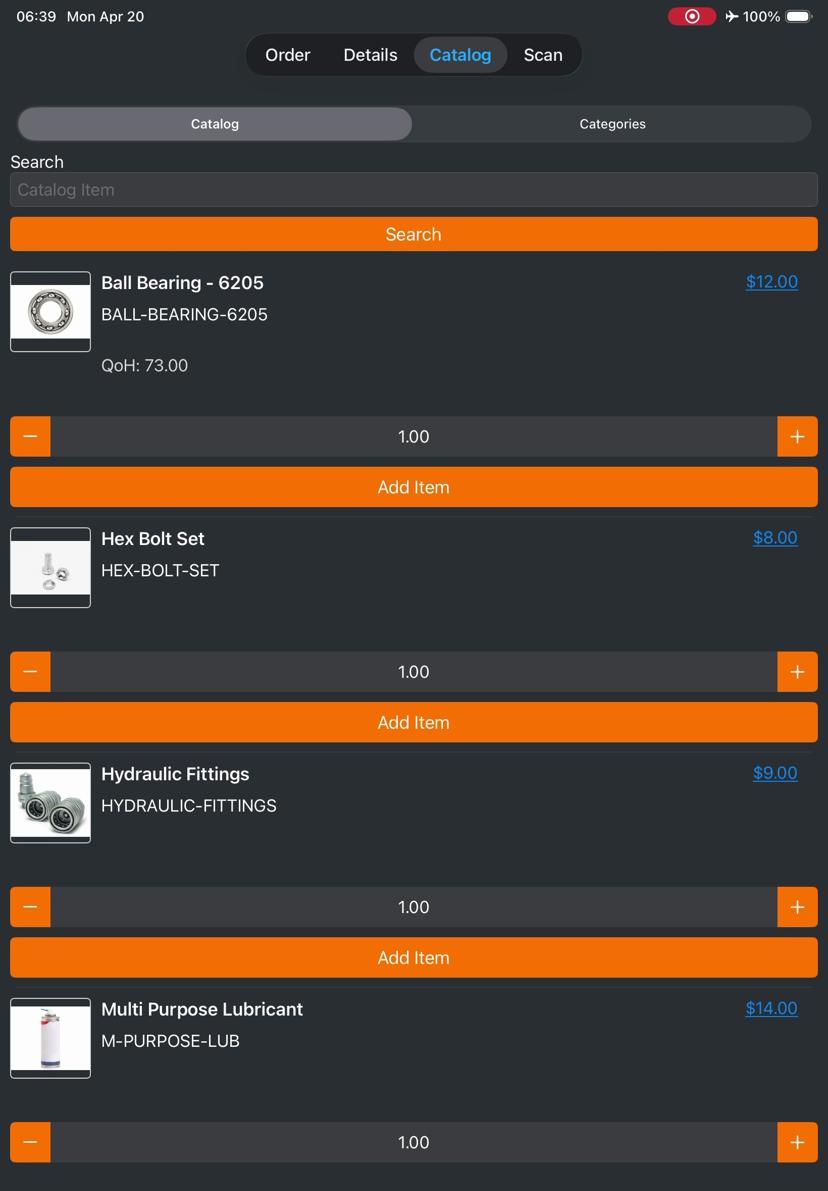
Viewing different customer catalogs and pricing at the booth
Barcode scanning with no network connection
Syncing orders when the rep is ready
Built for the Operational Realities of Trade Show Floors
Offline-First Architecture
Orders are written to local SQLite storage the moment a line is entered. No network round-trip. No spinner. No data loss if the device goes airplane mode or battery-saves itself mid-transaction. Orders persist in the local sync queue until the rep taps sync. Reps control when to push orders - no surprise uploads on metered convention center Wi-Fi. Conflict resolution handles edits made while offline.
Multi-Brand Catalog Support
One login, multiple brand catalogs. Each order is scoped to a single catalog, and reps can build separate orders from different catalogs for the same customer without logging out or reloading. Each catalog carries its own customer-specific pricing, SKU list, and image library. Catalogs refresh when the device is online; offline catalogs remain fully browsable and searchable.
Native Barcode Scanning
Camera-based scanning on iOS and Android. Native support for Code 128, EAN-8, EAN-13, UPC-A, and PDF417 formats. No external scanner required. No manufacturer lock-in. Scans resolve against the locally stored catalog, which means scanning works without a network connection. One scan adds a line; rapid sequential scanning supports high-volume line entry during peak booth traffic.
How Reps Take a 50-Line Trade Show Order on Orderwerks
Select the customer account before the buyer arrives
Pull up the buyer's account during the quiet moments. Their pricing tier and payment terms load from local storage. No network round-trip. If it is a new buyer, create the account inline and add them to the sync queue.
Browse the active catalog or switch brands
The rep works from the catalog most relevant to the current buyer. Switching between catalogs takes one tap. Each catalog preserves its own pricing, imagery, and SKU list.
Enter order lines by scanning or searching the catalog
Camera scanning handles Code 128, EAN-8, EAN-13, UPC-A, and PDF417 codes. Search by SKU, product name, or partial match. All catalog search and scanning works offline.
Adjust quantities, apply line-level notes, or attach photos
Buyers often ask for half of last time or flag a damaged sample. Reps adjust quantities inline, add per-line notes, and attach photos from the device camera without leaving the order.
Save the order and continue to the next buyer
The order saves locally and joins the sync queue. The rep moves to the next buyer without waiting. Reps control when to sync - after each order, at the end of the show day, or on hotel Wi-Fi that evening.
Try the Trade Show Workflow Yourself
Click through the same workflow a rep would run at a booth. No signup. No demo booking required.
Industries Where This Workflow Runs Every Week
Trade show ordering looks different across regulated and unregulated verticals. Orderwerks handles the compliance overlays each industry requires.
Wine & Spirits
Distributor portfolio shows, winery expo booths, spirits trade events with state-specific compliance.
Learn moreFirearms
ATF-regulated firearms shows with FastBound-integrated FFL compliance and acquisition logging.
Learn moreTobacco
Wholesale tobacco expos with transactional data capture for PACT Act compliance reporting.
Learn moreWholesale Distributors
Multi-brand distributor booths at regional trade shows, food service shows, and buyer markets.
Learn moreTrade Show Orders Flow Into Your Existing Systems
Orders captured at the booth sync to QuickBooks Online, QuickBooks Enterprise, and Fishbowl Inventory. Firearms inventory flows to FastBound for A&D logging. Customer-specific pricing tiers, payment terms, and credit holds are respected at the line level - reps cannot accidentally override a hold or apply the wrong tier.
Trade Show Ordering Questions
The Sales App is offline-first, not offline-tolerant. Orders, customer data, and catalogs live in local SQLite storage on the device. Reps can take orders for hours without any network connection. Orders persist in the local sync queue until the rep taps sync. No surprise uploads on metered convention center Wi-Fi.
Yes. One login supports multiple catalogs. Each order is scoped to a single catalog, and reps can build separate orders from different catalogs for the same customer without logging out. Each catalog carries its own customer-specific pricing, SKU list, and imagery.
Yes. Scanning uses the device's native camera and resolves against the locally stored catalog. Code 128, EAN-8, EAN-13, UPC-A, and PDF417 formats are supported. No external hardware scanner is required and no network connection is needed to add scanned items to an order.
Orders are written to local storage the moment a line is entered. If the device powers off, the order is preserved. When the device powers back on and the app reopens, the order resumes exactly where the rep left off. Completed orders remain in the sync queue until the rep taps sync.
Native iOS and Android. The app runs on iPad, iPhone, and Android tablets and phones. Trade show reps typically use iPad for the larger screen real estate, which fits multi-line order entry and catalog browsing more comfortably than a phone.
Run Your Next Trade Show on Orderwerks
Book a demo to see the workflow on your own catalog and customer data. Demos run 45 minutes on Zoom. No deck. No sales pitch. Just the app, your workflow, and honest answers about what it does and does not handle.
Book a Demo